

Introduction
“One of the executives receiving Microsoft Authenticator prompts several times. Could someone be trying to access the account?”
Whenever users report frequent MFA prompts, the first concern is usually security. Questions about compromised credentials, password spraying, token theft, or suspicious sign-in attempts quickly arise. When the affected user is a senior executive, these investigations become even more urgent because the impact on both security and productivity is much greater.
However, through many customer engagements, I’ve learned that these investigations aren’t just about confirming whether an account has been compromised. Customers also want to understand why users are being prompted so frequently and whether the authentication experience can be improved without weakening their security posture.
Recently, I was asked to investigate one such case involving a senior executive who believed they were receiving Microsoft Authenticator prompts far more often than expected.
At first glance, the Microsoft Entra Sign-in Logs contained hundreds of authentication records. Manually reviewing the logs quickly became overwhelming, making it difficult to answer some very simple but important questions.
- How many MFA prompts did the user actually receive?
- Which applications were generating those prompts?
- Which authentication methods were being used?
- Were these genuine MFA prompts or simply silent authentication events?
- Was there any indication of suspicious or risky sign-ins?
- Could the number of prompts be reduced without compromising security?
Rather than manually analysing every sign-in event, I queried the SigninLogs table in Azure Log Analytics using Kusto Query Language (KQL). Within minutes, the raw authentication data was transformed into a meaningful investigation report that both technical teams and business stakeholders could easily understand.
The investigation confirmed there was no evidence of compromised credentials or suspicious sign-in activity. More importantly, it revealed that the executive wasn’t actually approving dozens of MFA prompts each day as initially believed. Most authentication events were completed silently using Windows Hello for Business Passkeys, while the remaining visible prompts were traced back to a legacy application that wasn’t fully integrated with modern authentication.
This investigation not only reassured the customer that the environment was secure, but also identified several opportunities to improve the executive’s sign-in experience without reducing the organisation’s security posture.
In this article, I’ll walk through the same investigation process, explain the reasoning behind each KQL query, and show how the findings helped improve both security visibility and the overall authentication experience.
What You’ll Learn
By the end of this article, you’ll know how to:
- Determine how often a user is genuinely prompted for MFA.
- Identify which applications are generating authentication prompts.
- Analyse authentication methods using Microsoft Entra Sign-in Logs and KQL.
- Distinguish between genuine security concerns and normal authentication behaviour.
- Identify opportunities to improve the end-user authentication experience without weakening security.
- Build a reusable KQL investigation toolkit for future Microsoft Entra ID investigations.
Prerequisites
Before running the queries in this article, ensure the following prerequisites are in place.
- Microsoft Entra Sign-in Logs are configured to stream into Log Analytics.
- The SigninLogs table is available.
- You have Reader access to the Log Analytics Workspace.
- You have permission to view Microsoft Entra Sign-in Logs.
- For Risk information, Microsoft Entra ID P2 licensing is required.
Once these prerequisites are met, the investigation becomes straightforward.
Step 1 – Identify the Most Common MFA Method
The first step was understanding how the executive was completing MFA.
Were they using:
- Windows Hello for Business
- Microsoft Authenticator
- FIDO2 Security Keys
- OATH Verification Codes
- Password
Instead of guessing, I queried the AuthenticationDetails field to identify every successful MFA method.
Query 1:
let startDate = ago(60d);
let endDate = now();
SigninLogs
| where Resource == “Microsoft.aadiam”
and AppDisplayName != “Windows Sign In”
and TimeGenerated between (startDate .. endDate)
and UserPrincipalName =~ “user@contoso.com”
| extend AuthDetails = todynamic(AuthenticationDetails)
| mv-expand step = AuthDetails
| extend method = tostring(step.authenticationMethod),
succeeded = tostring(step.succeeded)
| where AuthenticationRequirement == “multiFactorAuthentication”
| where method != “Previously satisfied” and isnotempty(method) and succeeded == “true”
| summarize MethodCount = count() by method
| order by MethodCount desc
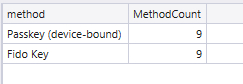
Investigation Result
The results immediately challenged the original assumption.
Over 70% of successful MFA authentications were completed using Windows Hello for Business Passkeys.
The executive believed they were constantly approving MFA prompts.
In reality, most of these authentication events happened silently in the background.
The only visible prompts occurred when accessing one particular business application.
That immediately changed the direction of the investigation.
Step 2 – Identify Which Applications Trigger MFA
Knowing the authentication method wasn’t enough.
The next question was:
Which applications were responsible for generating these authentication requests?
Query 2:
let startDate = ago(60d);
SigninLogs
| where TimeGenerated >= startDate
and UserPrincipalName =~ “user@contoso.com”
and AuthenticationRequirement == “multiFactorAuthentication”
and AppDisplayName != “Windows Sign In”
| extend AuthDetails = todynamic(AuthenticationDetails)
| mv-expand step = AuthDetails
| extend Method = tostring(step.authenticationMethod),
Succeeded = tostring(step.succeeded)
| where isnotempty(Method) and Method != “Previously satisfied” and Succeeded == “true”
| summarize Prompts = count(),
Methods = make_set(Method),
FirstSeen = min(TimeGenerated),
LastSeen = max(TimeGenerated)
by AppDisplayName, ResourceDisplayName, ClientAppUsed
| order by Prompts desc
Investigation Result
This query highlighted something interesting.
Microsoft 365 applications such as Outlook, Teams and SharePoint were behaving exactly as expected.
However, one internally developed business application generated a significantly higher number of authentication requests than every other application.
Instead of blaming Microsoft Authenticator, the customer now had clear evidence pointing to the real source of the repeated prompts.
Step 3 – Review Individual Authentication Events
The application summary provided a good overview, but the team also wanted evidence for each authentication event.
For every successful MFA challenge, I extracted:
- Timestamp
- Application
- Device
- Browser
- Operating System
- IP Address
- Country
- Conditional Access Status
- Risk Information
Query 3:
let startDate = ago(60d);
let endDate = now();
SigninLogs
| where Resource == “Microsoft.aadiam”
and AppDisplayName != “Windows Sign In”
and TimeGenerated between (startDate .. endDate)
and UserPrincipalName =~ “user@contoso.com”
and AuthenticationRequirement == “multiFactorAuthentication”
| extend AuthDetails = todynamic(AuthenticationDetails)
| mv-expand step = AuthDetails
| extend Method = tostring(step.authenticationMethod),
Succeeded = tostring(step.succeeded),
StepDateTime = todatetime(step.authenticationStepDateTime),
StepResult = tostring(step.authenticationStepResultDetail)
| where isnotempty(Method) and Method != “Previously satisfied” and Succeeded == “true”
| extend DeviceOS = tostring(DeviceDetail.operatingSystem),
DeviceBrowser = tostring(DeviceDetail.browser),
DeviceName = tostring(DeviceDetail.displayName),
TrustType = tostring(DeviceDetail.trustType),
City = tostring(LocationDetails.city),
Country = tostring(LocationDetails.countryOrRegion)
| project TimeGenerated, StepDateTime, AppDisplayName, ResourceDisplayName,
Method, StepResult, ClientAppUsed, IPAddress, City, Country,
DeviceOS, DeviceBrowser, DeviceName, TrustType,
ConditionalAccessStatus, RiskDetail, RiskLevelDuringSignIn,
CorrelationId, Id
| order by TimeGenerated desc
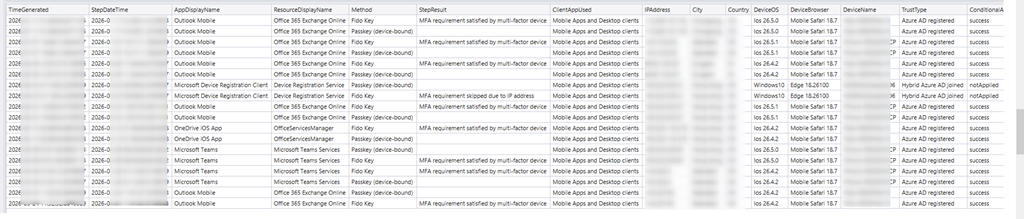
This detailed report became the appendix for the customer’s investigation.
Step 4 – Compare Authentication Methods Across Applications
While technical teams may analyse individual sign-in records, business stakeholders prefer a simple visual summary. A matrix comparing authentication methods against applications quickly highlights which applications are still generating traditional MFA prompts.
A simple matrix showing which authentication methods were used by each application proved far more effective.
Query 4:
let startDate = ago(60d);
SigninLogs
| where TimeGenerated >= startDate
and UserPrincipalName =~ “user@contoso.com”
and AuthenticationRequirement == “multiFactorAuthentication”
and AppDisplayName != “Windows Sign In”
| extend AuthDetails = todynamic(AuthenticationDetails)
| mv-expand step = AuthDetails
| extend Method = tostring(step.authenticationMethod),
Succeeded = tostring(step.succeeded)
| where isnotempty(Method) and Method != “Previously satisfied” and Succeeded == “true”
| summarize Count = count() by AppDisplayName, Method
| evaluate pivot(Method, sum(Count))
| order by AppDisplayName asc
With this, the customer could identify which applications supported modern authentication and which still depended on traditional MFA methods.
Step 5 – Analyse Authentication Trends
One of the most useful visualisations was the daily trend.
Instead of looking at individual sign-ins, I summarised authentication events by day.
Query 5:
let startDate = ago(60d);
SigninLogs
| where TimeGenerated >= startDate
and UserPrincipalName =~ “user@contoso.com”
and AuthenticationRequirement == “multiFactorAuthentication”
and AppDisplayName != “Windows Sign In”
| extend AuthDetails = todynamic(AuthenticationDetails)
| mv-expand step = AuthDetails
| extend Method = tostring(step.authenticationMethod),
Succeeded = tostring(step.succeeded)
| where isnotempty(Method) and Method != “Previously satisfied” and Succeeded == “true”
| extend Day = startofday(TimeGenerated),
DeviceOS = tostring(DeviceDetail.operatingSystem),
Country = tostring(LocationDetails.countryOrRegion)
| summarize Prompts = count(),
Apps = dcount(AppDisplayName),
Methods = make_set(Method),
OSes = make_set(DeviceOS),
Countries = make_set(Country)
by Day
| order by Day asc
Security Findings
The investigation confirmed that there was no evidence of a security issues. The authentication activity aligned with the organisation’s existing identity and access policies, and there were no indicators suggesting the executive’s account had been compromised.
Key findings included:
- No evidence of compromised credentials.
- No risky sign-ins detected.
- No impossible travel or unusual sign-in patterns.
- Authentication originated from trusted devices and expected locations.
- Conditional Access policies were functioning as designed.
These findings provided reassurance to both the executive and the security team that the authentication activity represented normal user behaviour rather than a security threat.
User Experience Improvements
While the investigation confirmed there was no security concern, it also identified several opportunities to improve the executive’s sign-in experience without reducing the organisation’s security posture.
The recommended improvements included:
- Review and modernise the legacy application that generated unnecessary MFA prompts by integrating it with Microsoft Entra ID and modern authentication.
- Validate Conditional Access policies, including Sign-in Frequency, to ensure they balance security with usability for trusted and compliant devices.
- Continue expanding the adoption of Windows Hello for Business and Passkeys to reduce visible MFA prompts while strengthening phishing-resistant authentication.
- Develop reusable KQL queries and dashboards to proactively monitor authentication trends and identify applications that generate excessive MFA prompts before users report them.
This investigation delivered value confirming the account was secure. It also provided a clear roadmap for improving the executive’s day-to-day authentication experience while maintaining a strong security posture.
Final Thoughts
Authentication investigations are often driven by user perception rather than evidence. A user may feel they’re constantly being prompted for MFA, while the authentication logs tell a very different story.
In this excercise, Microsoft Entra Sign-in Logs, Azure Log Analytics, and KQL transformed hundreds of authentication records into meaningful insights. The investigation confirmed there was no evidence of compromised credentials or suspicious sign-in activity, while also identifying a legacy application that was responsible for most of the visible MFA prompts.
By combining Microsoft Entra Sign-in Logs with Log Analytics and KQL, organisations can replace assumptions with evidence, validate their security posture, and make informed decisions that improve both security and user experience.
Hope you enjoyed reading the article!