

We all know about what is SCCM client center tool and what it does.
Roger Zander who has developed this application (SCCM Client Center) basically to troubleshoot SMS/SCCM 2007 Client related Issues.This also provides lot many features to troubleshoot all kind sccm client related issues more http://sccmcat.codeplex.com/.
Download Client center Tool for Configuration manager 2007 from http://sourceforge.net/projects/smsclictr/
Download download Client center Tool for Configuration manager 2012 http://myitforum.com/cs2/blogs/rzander/archive/2012/05/22/client-center-for-configuration-manager-2012.aspx
How do you run this tool with different user if logged in account do not have enough rights?
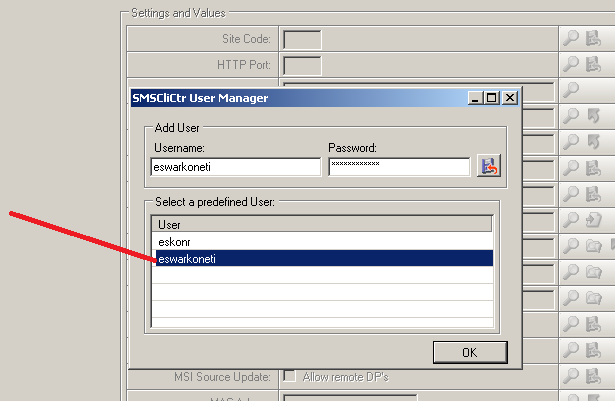
You can run this tool by holding alt+Shift to get run as different user but every time I do not prefer to go with this option rather I save the credentials (multiple Accounts you can do I suppose) on the tool
so when ever you launch the tool,you can select which account do you use to connect to target computer.
From your sccm client center tool,on the right top corner you see options—>select User


Enter the Username and Password and click Save Button. This way you can save multiple Accounts to connect to target computer if logged on user do not have enough rights.
Close the Tool and Reopen it again to select the authentication to connect to target computer.

Select the Account to connect to Target Computer
Until Next !
3 Comments
I can not find this option in the latest version. Is it removed?
Hi Tobias,
It has been long time since i have used this tool. If you cannot find the option in the latest version, may need to reach out to the creator of the tool if there is any other workaround.
Thanks,
Eswar
This is very attention-grabbing, You're an overly skilled blogger. I've joined your feed and sit up for in quest of extra of your magnificent post. Also, I have shared your site in my social networks