

create reports for the requirement and i first start analyzing the necessity and find the information about the required information where they stored in SCCM Database (SQL views). Most of the reports (SQL) that i have created in this blog created with basic syntax’s like joins. Only certain reports go beyond the joins but still not that difficult until you know the logic to achieve the results.
In this post, i wanted to bring up, how the SQL syntax join's will help you to achieve the desired results. You basically need to understand how these joins works.
Joins? In Simple terms ,this is used to combine more than 2 tables and get the required information .you can use joins in SQL reports in different ways like inner join, outer join, left join etc.
A JOIN is a means for combining fields from two tables by using values common to each. ANSI standard SQL specifies four types of JOIN: INNER, OUTER, LEFT, and RIGHT.
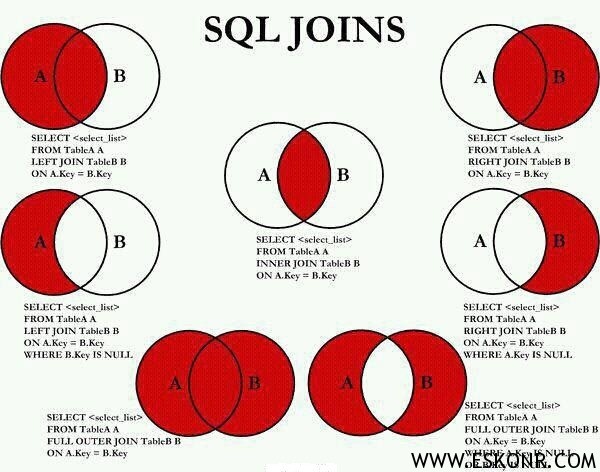
Here is nice Pictorial representation of using SQL Joins. You can keep it as reference when creating reports/collections on the need basis.
INNER JOIN: This Join used to get result when there is at least one match in both tables.
LEFT JOIN: This Join used to get all rows from the left table even if there are no matches in the right table.
RIGHT JOIN: This Join used to get all the rows from the right table, even if there are no matches in the left table
Full Join: This Join used to get all rows when there is a match in one of the tables.
2 Comments
Hi,
I am looking for SCCM2012 query for patch status from specific deployment and specific collection. I need the following details in my patch report with against each machine name
Total patch count in deployment
Total patch count installed
Total patch count missing
Total patch count not required
Did you check the default reports ? You should get something to proceed further.I can get back to you on this later once am done with this.