

Long back created a report for the monthly Patch statistics which can be found in http://www.windows-noob.com/forums/index.php?/topic/1764-patch-management-report-in-sms-2003/#entry6281
Below all the reports have been created using the last state messages.Even you can create different type of quiries based on this.

I was referring to the Patch process and found an image which gives the statistics for the listed patches in a good viewable way.so thought of creating such a report and can be linked to other report to get preferable colums which are necessary.May be i can show it to the management team for the patch activity on monthly basis.This basically requries to create 3 reports( like 1,2,3 ) out of which 3 is linked to 2 and 2 is linked 1.It is just simple that you can run only one report which is linked to other reports which gives u a report like below for the given bulletin ID’s.
Note:The below report is filterd with language swedish,if you want to get status for English/other language patches,you can customise it.The below report is called 1)Patch Management summary

To Build this report and to link to other reports ,you will have to create 3 reports which i named it like :1)Patch Management summary 2)Status of Each bulletin ID 3)Status of each bulletin ID with distribution status
Create new reports for each with the below query.
3)Status of particular bulletin ID with selected distribution status:
select distinct sys.Netbios_Name0, sys.User_Domain0, sys.User_Name0, fcm.SiteCode, ws.LastHWScan,
DATEADD(ss,@__timezoneoffset,ps.LastStatusTime) as LastStatusTime, PSX.TimeApplied0,ps.LastStatusMessageIDName, ps.LastExecutionResult
from v_R_System sys
join v_FullCollectionMembership fcm on sys.ResourceID=fcm.ResourceID
join v_GS_WORKSTATION_STATUS ws on sys.ResourceID=ws.ResourceID
join v_GS_PatchStatusEx ps on sys.ResourceID=ps.ResourceID
join v_GS_PATCHSTATEEX PSX on PSX.ResourceID=ps.ResourceID
join v_ApplicableUpdatesSummaryEx summ on
ps.UpdateID=summ.UpdateID
where (ps.LastStateName=@status and summ.ID=@Title) and
(summ.Type = ‘Microsoft Update’) and (summ.product NOT LIKE ‘Windows Server 2003’)
group by Netbios_Name0, user_Domain0,user_Name0,SiteCode,LastHWScan,LastStatusTime,LastStatusMessageIDName,TimeApplied0,LastExecutionResult
order by Netbios_Name0
Click on the “Prompts Button”
Create a new prompt with the following Name: “status”
Give it a prompt text for ex: Select the Status
Provide the following sql statement to the prompt for status with the given syntax
select distinct LastStateName from v_GS_PatchStatusEx
Create another prompt value for Title with the sytax query :
Select Title,ID,Product from v_GS_PatchStatusEx
Create report 2 called Status of Each bulletin ID
declare @n float
select @n = count(distinct ps.ResourceID)
from v_GS_PatchStatusEx ps
join v_FullCollectionMembership fcm on ps.ResourceID=fcm.ResourceID
join v_ApplicableUpdatesSummaryEx summ on
ps.UpdateID=summ.UpdateID
where (ps.ID=@Title or ps.QNumbers=@Title or ps.Title=@Title) and
(summ.Type =’Microsoft update’) and (summ.product NOT LIKE ‘Windows Server 2003’)if IsNULL(@n,0) = 0 return
select @Title as Title, ps.LastStateName, count(distinct ps.ResourceID) as ‘Totals’,
ROUND(100.0 * count(distinct ps.ResourceID)/@n,2) as ‘Percentage %’from v_GS_PatchStatusEx ps
join v_FullCollectionMembership fcm on ps.ResourceID=fcm.ResourceID
join v_ApplicableUpdatesSummaryEx summ on ps.UpdateID=summ.UpdateID
where (ps.ID=@Title or ps.QNumbers=@Title or ps.Title=@Title)
and (summ.Type = ‘Microsoft update’ ) and (summ.product NOT LIKE ‘Windows Server 2003’)
group by ps.LastStateName
Prompt for Title: select Title,ID,QNumbers from v_GS_PatchStatusEx
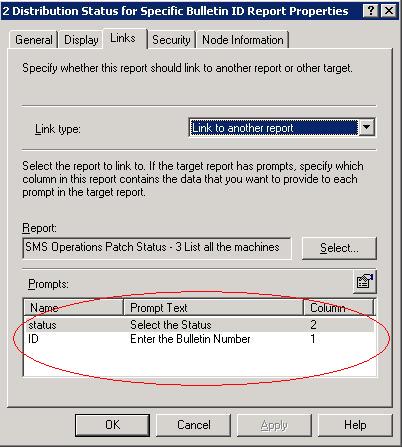
Once you create the report,just right click on the report and choose properties ,Choose the “Links” tab , Choose link Type: “link to another report“choose the report the one which you created above(report 3 in this case). make sure you have selected the correct columns which are marked in red circle
 almost we come to an end by creating last report called 1) Patch Management summary
select summ.ID,summ.QNumbers as ‘Q Number’,
COUNT(distinct ps.ResourceID) as ‘Requested’,
COUNT(distinct case when ps.LastState=107 or ps.laststate=102 or ps.laststate=105 then ps.ResourceID else NULL End) as ‘Installed’,
ROUND(100.0*COUNT(distinct case when ps.LastState=107 or ps.laststate=102 or ps.laststate=105 then ps.ResourceID else NULL End) /count(distinct ps.ResourceID),2) as ‘Success %’
from v_GS_PatchStatusEx ps
join v_ApplicableUpdatesSummaryEx summ on ps.UpdateID=summ.UpdateID
where (summ.ID=’MS10-006′ or summ.ID=’MS10-007′ or summ.ID=’MS10-008′ or summ.ID=’MS10-013′) and (summ.Type=’Microsoft Update’) and (summ.product NOT LIKE ‘Windows Server 2003′) and (summ.language=’Swedish’)
group by summ.ID,summ.QNumbers
order by summ.ID
If you want to get the information from particular collection,then you can limit the Above report on a specified collection ,here is the one to go.
select summ.ID,summ.QNumbers as ‘Q Number’,
COUNT(distinct ps.ResourceID) as ‘Requested’,
COUNT(distinct case when ps.LastState=107 or ps.laststate=102 or ps.laststate=105 then ps.ResourceID else NULL End) as ‘Installed’,
ROUND(100.0*COUNT(distinct case when ps.LastState=107 or ps.laststate=102 or ps.laststate=105 then ps.ResourceID else NULL End)
/count(distinct ps.ResourceID),2) as ‘Success %’
from v_GS_PatchStatusEx ps
JOIN v_FullCollectionMembership fcm on ps.ResourceID=fcm.ResourceID
join v_ApplicableUpdatesSummaryEx summ on
ps.UpdateID=summ.UpdateID
where (summ.QNumbers=’975562′ or summ.QNumbers=’978695′ or summ.QNumbers=’979482′ or summ.QNumbers=’980195′ or summ.QNumbers=’982381′) and
(summ.Type=’Microsoft Update’) and (summ.product NOT LIKE ‘Windows Server 2003’) and(fcm.CollectionID =@collID)
group by summ.ID,summ.QNumbersorder by summ.ID
You would need to create promot collId given below:
begin
if (@__filterwildcard = ”)
select CollectionID, Name from v_Collection order by Name
else
select CollectionID, Name from v_Collection
WHERE CollectionID like @__filterwildcard
order by Name
end
The above report will generate status for specific bulletin ID’s for swedish language in brief.If you want to generate report for other languages or you want to get patch status irrespective of Laguage,you can simply delete it.
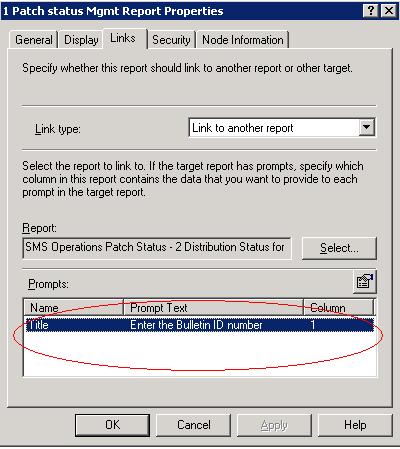
Once you create this report,right click and select properties.Choose the “Links” tab,Choose link Type: “link to another report” ,choose the report that you have created above(report 2 inthis case).ensure you have the correct columns fields like below otherwise you will mislead the report.
 you have done now,reports are ready for you.

Report for Particular Bulletin ID ,click on MS10-007

click on failed status,which gives you all machines

Hope it helps you insome way.The same reports are still work in SCCM in similar way but before doing it SCCM,change the bulletin ID numbers and language(in mycase it is Swedish)
Note: when you copy and paste the quiries to your SMS/SCCM server ,you might see some errors because of copy and paste.All these quiries are present in notepad attached here Status report quiries
All the reports are working well in SCCM environment but you will have to remove a part of syntax called “and (summ.product NOT LIKE ‘Windows Server 2003’)” from the reports which you use since in SCCM,the product value is NULL.If you use the above quiries without modifying,you may see blank report.
65 Comments
Pingback: Patch Management | Process Street
While creating report 2, i’m getting an error “Msg 137 Level 15 – Must declare the scalar variable’
in line Line 13 and Line 19!!!
Not sure why?? please help?
declare @n float
select @n = count(distinct ps.ResourceID)
from v_GS_PatchStatusEx ps
join v_FullCollectionMembership fcm on ps.ResourceID=fcm.ResourceID
join v_ApplicableUpdatesSummaryEx summ on
ps.UpdateID=summ.UpdateID
where (ps.ID=@Title or ps.QNumbers=@Title or ps.Title=@Title) and
(summ.Type =’Microsoft update’) and (summ.product NOT LIKE ‘Windows Server 2003’)
if IsNULL(@n,0) = 0 return
select @Title as Title, ps.LastStateName, count(distinct ps.ResourceID) as ‘Totals’,
ROUND(100.0 * count(distinct ps.ResourceID)/@n,2) as ‘Percentage %’
from v_GS_PatchStatusEx ps
join v_FullCollectionMembership fcm on ps.ResourceID=fcm.ResourceID
join v_ApplicableUpdatesSummaryEx summ on ps.UpdateID=summ.UpdateID
where (ps.ID=@Title or ps.QNumbers=@Title or ps.Title=@Title)
and (summ.Type = ‘Microsoft update’ ) and (summ.product NOT LIKE ‘Windows Server 2003’)
group by ps.LastStateName
Thanks for the response.
You are right! But most of the machines are showing as update is not required and same patch is install manually.
so i am afraid that there should be a problem.
i would start looking into the client logs to find whats is going wrong. check this link .. http://eskonr.com/2015/04/sccm-2012-troubleshoot-client-software-update-issues/
so you say that, report is telling,patch is not required but the same patch,you can install manually ? that should not be the case.
Hi Eswar,
In our environment most of the machines are showing as compliance in report but if we checked the individual report / machine its showing as ‘update is not required’.
After several investigations, I’ve found that wua agent version in server (7.4.7600.226) is less compared to clients (7.5.760.17514). so I’ve upgraded the server to 7.6.7600.228. However still machine is not getting the patches and I’ve done repairing the wmi, wua and client. But nothing is happening.
My wsus server version is 3.2.7600.226. However i’ve also tried to fix through windows update troubleshoot and got the error 0x80080005.
So could you please help me on this? Appreciated your quick response. Much thanks.
you can ignore those machines that says update is not required.Update is not required means the client says ,it doesnt need any updates that you have deployed i.e those updates are not applicable. Even if you try to install these updates manually on the client,am sure it will say not applicable.
When I click on the Update ID in report #1 (after identifying a specific Collection ID in the prompt),it returns the distribution state for all machines in the environment, and not just the ones in the Collection (Collid) I’ve defined in the previous window. Any reason why? I want to report on a specific patch, on servers in a particular collection only, then see which ones haven’t installed the patch yet. This gives me all machines in the organization.
Yes. As above. I had did the same as below:
Report 3 – Prompt for “Title”: Select Title,ID,Product from v_GS_PatchStatusEx
– Prompt for “Status”: select distinct LastStateName from v_GS_PatchStatusEx
Report 2 – Prompt for “Title”: select Title,ID,QNumbers from v_GS_PatchStatusEx
Saw comments above like somebody else also having same problem with me. I found this report is really useful just too bad no data from report 3, can’t get details which PC inside.
can you take the SQL code and it in SQL management studio and see if that results anything ? i dont have cm07 to test but they work fine though.
i have also uploaded the MOF file with these reports you can try importing the mof file to avoid any issues.
I also can’t get details from report 3.
I had link report 2 to 3. when click on PC details from report 2 it prompted “No matching records could be found.” I had also added promt “title” as above in post. Can advise?
can you check if the prompts in the linked report are chosen as said in the blog ?
Eswar,
Do you have these reports converted over to 2012? I would love to see one for the below:
Update ID Active Systems Required Not Installed Needs Reboot Installed Compliant
MS14-041 7210 5970 5197 176 597 10%
MS14-040 7210 5969 5196 182 591 9%
thank you,
Amy
you really dont need reports like this in CM12 as you can get the compliance status for each KB Article from CM12 software update group (contains list of patches). also it would be difficult to provide the KB manually if there are n number of patches to know the status.
This is exactly what my manager wants to see. However, I can’t create these query in SCCM CB 1706 since it can’t find v_GS_PatchStatusEx ps in dbo. I’d appreciate if you could show me how to build this report in SCCM 2012 or above.
Thanks in advance
Hoang
Hi Hoang,
thanks for the feedback. I will look into this and update the report to support for SCCM 2012 and above.
Regards,
Eswar
Eswar,
Great post. It just saved me a tremendous amount of time keeping management up to date on patching. Is there a simple report that can be created that will tell me similar information for non-Microsoft installations? For example, I am trying to create a a report that gives me the the count of Mozilla Firefox and the number that are running the latest version, 24.3.0. Trying to get it formatted similar to above, requested, installed, success %. Any help would be greatly appreciated.
patch management and applications are 2 different things.Client will scan WSUS to know what patches missing ,installed etc but about aplications,they dont request rather we deploy applications .with the applications,you can generate report how many accepted,installed,failed etc but to know these,you already have lot of builtin reports for specific advertisement.
Hi,
I am unable to get these reports to work. I would like this report to query Windows Server 2003 and Windows Server 2008 systems. We are currently using SCCM 2007 R3.
Any help is much appreciated.
Thanks
what are you getting error ? do you get empty results ? did you try this for SCCM 2007 http://eskonr.com/2011/10/sccm-monthly-patch-statistics-reports-to-the-management-in-a-simplified-manner/ ?
Hi there outstanding blog! Does running a blog such as this require a large amount of work?
I’ve absolutely no knowledge of programming however I had been hoping to start my own blog soon. Anyways, should you have any ideas or techniques for new blog owners please share. I know this is off subject nevertheless I just wanted to ask. Many thanks!
You dont need to have programming knowledge much as there are many ready made blogs just Manage them Via GUI but if you are aware of any HTML technologies like PHP ,you can customize it for look and feel.
Looking for a SQL query to list down the computer name with patches update success or failure based on the unique deployment id on SCCM 2007
how about default reports ? have you tried them ?
Hi,
I am looking for SCCM2012 query for patch status from specific deployment and specific collection. I need the following details in my patch report
Total patch count in deployment
Total patch count installed
Total patch count missing
Total patch count not required
Did you check the default reports ? You should get something to proceed further.I can get back to you on this later once am done with this.
Hi, Thx a lot
Hi, We use SCCM 2012…
How can i usee it for sccm 2012 ?
Can u send me pls mof files, i cant download from your links 🙁
you canot use this report in sccm as the views are changed in database not the same as avilable in sms 2003/ sccm 2007.
You have lot default reports avilable which can do similar job but i will try to figure it out if if there is way to use the same in SCCM 2012.
could you please sent to me doc with screen shoot. it help me to mote understand
what document are you looking for ? all the information is available on the web.
I think I got it to work. What I needed was:
MS10-050 10 Patched 20 Missing
MS11-123 1000 Patched 0 Missing
In your example they are first grouped by MS number then by KB number.
But I think I made it work.
Glad u made it work.
I am trying to modify the first report to only show where update id is not blank.
I have tried:
ps.UpdateID!=”
summ.UpdateID!=”
ps.UpdateID like ‘MS-%’
summ.UpdateID like ‘MS-%’
but with no luck.
Also if possible I need to combine all patch numbers for a each specific MS instead of have multiple lines.
For example you first photo shows MS10-013 on 2 lines.
I need them on one line, with the total installed and total required (which would be 5528 and 5462 respectively)
Thanks!
hi,
Are you trying to list all with no UPdate IDs ? ps.UpdateID!=”
what is your requirement ?
Good Going Eswar..A very nice website
Very great post. I simply stumbled upon your blog and wanted to say that I’ve truly enjoyed surfing around your weblog posts. After all I will be subscribing on your feed and I hope you write once more very soon!
Pingback: College Textbooks
hi Eswar,
is it possible to get the patch information from the update list? for example we have an Update List named windows servers 2003 and i want that status
Thanks
Yes,you can get the status from update list .try using default reports avilable with catagory software updates–A.Compliance and D.Deployment status
i guess you can’t help then??!!??
Hi Eswar,
I have cut the query down to the bare necessities. Here is the query:
Select Distinct
v_R_System.Name0,
v_UpdateInfo.BulletinID
from v_updateComplianceStatus
join v_UpdateInfo on v_UpdateInfo.ci_id=v_updateComplianceStatus.ci_id
join v_r_system on v_updateComplianceStatus.resourceID=v_r_system.resourceID
WHERE v_updateComplianceStatus.status=2 and bulletinID like ‘ms%’
group by name0, bulletinid
order by name0
Thanks for any help with this
NO MATCHING RECORDS COULD BE FOUND – why?
You might want to NOT annoy people, getting them to create their own reports, only to include a link later for them to download saving them all that time. I say ALL THAT TIME, because none of you code is tagged as code in this web page, so all the quotes are wrong (curly, not straight).
Very very frustrating, and ultimately a complete waste of time because it did not work! 😮
It works for everyone including me in my production environment. If the report says no matching records found,it is not falut with report query rather there are no records that matches from the values given in the query.can you post the query what are you trying for ?
also did you change the order in the linked report as said in the blog since the output of report will be the input of another report so columns must match else you will get no matching records found.
Hi Eswar,
Here is the query statement: (More explanation after)
————————————————————————–
Select Distinct
v_R_System.Name0,
v_GS_SoftwareFile.filename as ‘server group’,
‘Waiting Reboot’ = case when v_UpdateComplianceStatus.LastEnforcementMessageID =’9′ then ‘*’ else ” end,
v_gs_operating_system.lastbootuptime0 as ‘last boot up’,
v_UpdateInfo.BulletinID,
v_UpdateInfo.ArticleID,
–v_UpdateInfo.dateCreated,
v_UpdateInfo.isexpired,
v_UpdateInfo.IsSuperseded,
v_UpdateInfo.Title
from v_updateComplianceStatus
join v_UpdateInfo on v_UpdateInfo.ci_id=v_updateComplianceStatus.ci_id
join v_r_system on v_updateComplianceStatus.resourceID=v_r_system.resourceID
Join v_ClientCollectionMembers on v_ClientCollectionMembers.ResourceID=v_r_system.ResourceID
join v_gs_softwarefile on v_gs_softwarefile.resourceid = v_r_system.resourceid
join v_gs_operating_system on v_gs_operating_system.resourceID = v_R_System.ResourceId
WHERE v_updateComplianceStatus.status=2 and bulletinid like ‘ms%’ and bulletinid != ‘ms10-090’ and v_Gs_SoftwareFile.FileName like ‘SVRGRP%.flg’
GROUP BY v_r_system.Name0, BulletinID,articleID, title, isdeployed, IsSuperseded, v_UpdateInfo.isexpired, v_UpdateComplianceStatus.LastEnforcementMessageID, v_GS_SoftwareFile.filename,v_gs_operating_system.lastbootuptime0
order BY v_GS_SoftwareFile.filename, v_r_system.Name0, BulletinID
—————————————————–
There is more in this statement obviously, as this is what we are using now. This gives one row per update per server.
We have server groups for update patching so I can sort by that later if needed. Management also wants to know if a system is “pending reboot” so I added that column.
I know I can, and want to remove the articleID and Title columns too. This is the original query I started with. I have deleted the others out of frustration.
Thank you
That chart does not look good. Let me try again:
System Name Needs reboot Last Booted Bulletin ID
System A 2011-08-20 01:07:00.000 MS11-071, MS11-072, MS11-073, MS11-074
System B * 2011-09-10 10:46:00.000 MS11-071
System C * 2011-08-20 10:04:00.000 MS10-065, MS11-070,
System D 2011-05-20 12:46:00.001 MS11-002
System E * 2011-05-20 10:46:00.002 MS10-066, MS11-003, MS11-074
The “*” would indicate a reboot is pending on that system.
right now I have a report that looks like this:
Name Reboot needed last reboot BulletinID
System A 2011-08-20 01:07:00.000 MS11-071
System A 2011-08-20 01:07:00.000 MS11-072
……. And so on. EACH bulletin causes a new line.
I want Each SYSTEM to be on one line with all buletins listed.
Thanks in advance for any help.
can you post ur query(the report in which u r getting multiple rows with same computer name but different bulletin ID’s).
Did you use group by syntax in ur query ? post looking into ur sql query ,i can help you.
Eswar,
you seem to be the SQL guru we need. I am trying to create a compliance report that looks like this:
System Name Needs reboot Last booted BulletinID
Server A * 2011-05-20 10:46:00.000 MS10-048, MS10-055, MS11-041
Server B 2011-08-19 22:41:00.000 MS11-065
Server C 2011-05-20 10:20:00.000 MS11-065, MS11-071
I do have a working report but this lists multiple lines for a system depending on how many required patches it is missing.
Being green with SQL I am stuck. I believe I need to create a table, but nothing has worked so far.
Any ideas?
Eswar,
I’m having no luck running any of these reports and was hoping you could help.
We have a mixed environment of a few server 2000, 2003, 2003 R2, 2008 and 2008 R2….and all updates are in English.
I’d like to be able to see a list of all of my servers, their overall compliancy percentage, how many updates they need, and then see which updates they are missing.
Is this possible?
Yes,you can do that.the posted report gives you information on desktop patches not includes servers.to have that,you will have to remove summ.product NOT LIKE ‘Windows Server 2003 and se if you can get it.
I have amended the queries and removed the references to (summ.product NOT LIKE ‘Windows Server 2003′) as we are a Windows 2008 R2 only house and the first 2 reports work.
However when you dive into the 3 report looking for the actual machines for each patch you then receive ‘no records…’. Any ideas? Thanks
you should link the 2nd report to 3re report in such a way that ,3rd report input should be the first column of 2nd report.
check if you have linked the report properly or not.
OK do you need amend the SQL statement for each and every patch? I just want a report on all patches deployed and their status. Is this not possible? Thanks
Hi
I have downloaded the MOF file and imported it successfully in SCCM 2007 SP2 R3. Then linked them together.
However when I run the first report I always get nothing – ‘No matching records….’
What am I doing wrong?
Thanks
Did you change the patch number(KB or MSID numbers ) what are you looking for ?
to see if there are any matching records avilable in DB or not ,identify computer and look for resource explorer for checking the patch installation.
Hi,
The below link is not working .
https://docs.google.com/leaf?id=0B7bRoL0yQL84MzUwZWVhNjktY2IzMy00M2Q4LThkYmMtMGZkMjZhMWY3MmZi&hl=en&authkey=CLzwqJ0C
an you send me the MOF file to csemoorthy21@yahoo.com
i can able to download it. Can you try this link https://docs.google.com/leaf?id=0B7bRoL0yQL84MzUwZWVhNjktY2IzMy00M2Q4LThkYmMtMGZkMjZhMWY3MmZi&sort=name&layout=list&num=50
Hi Eswar ,
your idea for patch report is very nice, can we create patch report on collectionwise deployment report on monthly basis.
means i have 10 collections of sms client and deployed patch on that,how to make report of deployment report.
please suggest.
thanks
irshad
Hi,
Yes,you can create and get the status of the patches for a particular collection.You can edit the 1st report add fcm.CollectionID =@collID to where condition.Create a prompt for thsi to list the collections.
There is report avilable how to apply the report onto collection with heading If you want to get the information from particular collection,then you can limit the Above report on a specified collection ,here is the one to go.
Still if you are unable to create,comment it on this.
Hi Eskon, I created the first report but I am gettting the following error:
Msg 137, Level 15, State 2, Line 3
Must declare the scalar variable “@__timezoneoffset”. New to sql, could you please provide me wuth the declaration.
Are you creating these reports in SMS or SCCM Environment ?
For easy made,I have uploaded these 3 reports into single MOF file .below is the path to download
https://docs.google.com/leaf?id=0B7bRoL0yQL84MzUwZWVhNjktY2IzMy00M2Q4LThkYmMtMGZkMjZhMWY3MmZi&hl=en&authkey=CLzwqJ0C
You can download and import it to SMS reports directly.
dont forget to link the reports since,the output of first report is given as input to 2nd report ,same follow to 3rd report as well.
Let me know if you face any issues ?
Here is a post that offers some more surprising stats about Patch management.
http://links.maas360.com/stateOfPatchManagement
In 3rd report ,you have @tile and you should declare the prompt value for Title but before it was given ID to declare prompt value.Now it is corrected .you should create prompt value called Title in Both the reports 3 and 2
Hi Eskon,
I tried all the steps as shown above the queries and screen shots but while creating the 3rd report its asking the Title variable declartion so i assigned the Title as varchar.
But while excuting the reports am not getting the expected results from 3rd Report( its not showing me the host names and any data).
Looking forward from you.
Syed, did u create link to the 2nd report to third report as shown above .Go to the report 2 called Status of Each bulletin ID and link to the third report because,the input for 3rd report which u r looking should comes from 2nd report results… the first column input is ID and 2nd column input is status .
Hi,
I tried all the steps as you given the pictures , first two reports are working fine but third reports is not giving any data, its showing me the Records not Found”.
In first table itself its shown me the error for @Title so i declared but while running third report its no data.
Provide me the third report.
Thanks in advance.
Syed