

Today’s post is going to listing down computers assigned to specific site with count and this will be linked to another report that gives you computer asset information.
If you have referred my previous post on computer asset information http://eskonr.com/2011/12/sccmconfigmgr-report-for-computer-asset-information-serialnumber-manufacturermodelprocessorip-addresshardaware-scan/ OR http://eskonr.com/2009/12/sccm-report-for-computers-asset-information-including-sn-number-and-model-name/ ,then it would be easy for you make it.
You need to create 2 reports 1)Count of Computers from AD site 2) list the computers assigned to specific Site
Create new report from reports node for 2) list the computers assigned to specific Site using the below SQL query(quotes posted in this blog are converted to fancy,please replace them with correct ones in your report) :
SELECT
A.Name0,
MAX (B.SerialNumber0) AS ‘Serialnumber’,
A.Manufacturer0,
A.Model0, C.Name0 AS ‘Processor’,
D.TotalPhysicalMemory0 AS ‘Memory (KBytes)’,
MAX ( E.Size0 ) AS ‘Size (MBytes)’,
MAX (F.MACAddress0) AS ‘MAC Adress’,
MAX (F.IPAddress0) AS ‘IP Adress’,
G.AD_Site_Name0 AS ‘AD Site’,
MAX (A.UserName0) AS ‘Last user logged in’,
H.Caption0 AS ‘Operating System’,
H.CSDVersion0 AS ‘Service Pack’,
G.Creation_Date0 AS ‘Creationdate in SMS’,
I.LastHWScan
FROM
v_GS_COMPUTER_SYSTEM A,
v_GS_PC_BIOS B,
v_GS_PROCESSOR C,
v_GS_X86_PC_MEMORY D,
v_GS_DISK E,
v_GS_NETWORK_ADAPTER_CONFIGUR F,
v_R_System G,
v_GS_OPERATING_SYSTEM H,
v_GS_WORKSTATION_STATUS I
WHERE
A.ResourceID = B.ResourceID AND
A.ResourceID = C.ResourceID AND
A.ResourceID = D.ResourceID AND
A.ResourceID = E.ResourceID AND
A.ResourceID = F.ResourceID AND
A.ResourceID = G.ResourceID AND
A.ResourceID = H.ResourceID AND
A.ResourceID = I.ResourceID
AND G.AD_Site_Name0=@ADSITE
GROUP BY A.Name0, A.Manufacturer0, A.Model0, C.Name0, D.TotalPhysicalMemory0, G.AD_Site_Name0, A.UserName0, H.Caption0, H.CSDVersion0, G.Creation_Date0, I.LastHWScan
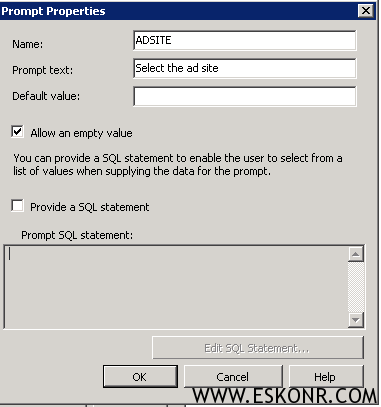
Create a prompt for ADSITE with blank query as shown below :
Now create another report 1)Count of Computers from AD site with below SQL query :
Select a.AD_Site_Name0 as [AD Site],Count(a.Netbios_Name0) as [Total Computers] from v_R_System a
group by a.AD_Site_Name0
order by a.AD_Site_Name0
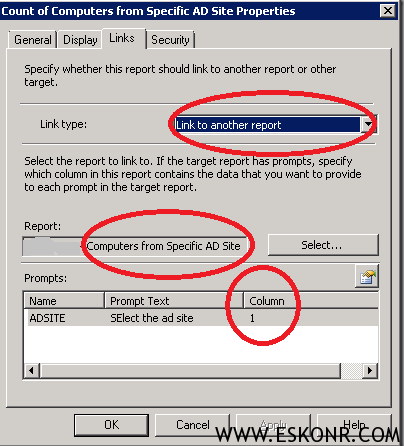
Once done, right click on above report and go to properties of 1)Count of Computers from AD site ,click on link
in link type select link to another report under report select the 2nd report 2) list the computers assigned to specific Site
and click on the prompt (hand symbol) and select column 1 as prompt shown like below.
You are done now ! 🙂
2 Comments
HelloEswar, can we add dbo.User_Disc.physicalDeliveryOfficeNam0 AS ‘Office Location’ or is there any way to get the office/branch location to this report through AD ?
if the user information is discovered by AD user discovery ,you can add the information to report. if you are sure that ,physicaldeliveryofficename0 store the information about user location ,you can join v_r_system username with v_r_user username to display user location in report.
Regards,
Eswar